LogoTop AI Hubs
icon of AI Bulk Image Generator

AI Bulk Image Generator

AI bulk image generator creating hundreds of high-quality visuals instantly from prompts or CSV.

Introduction

What is AI Bulk Image Generator

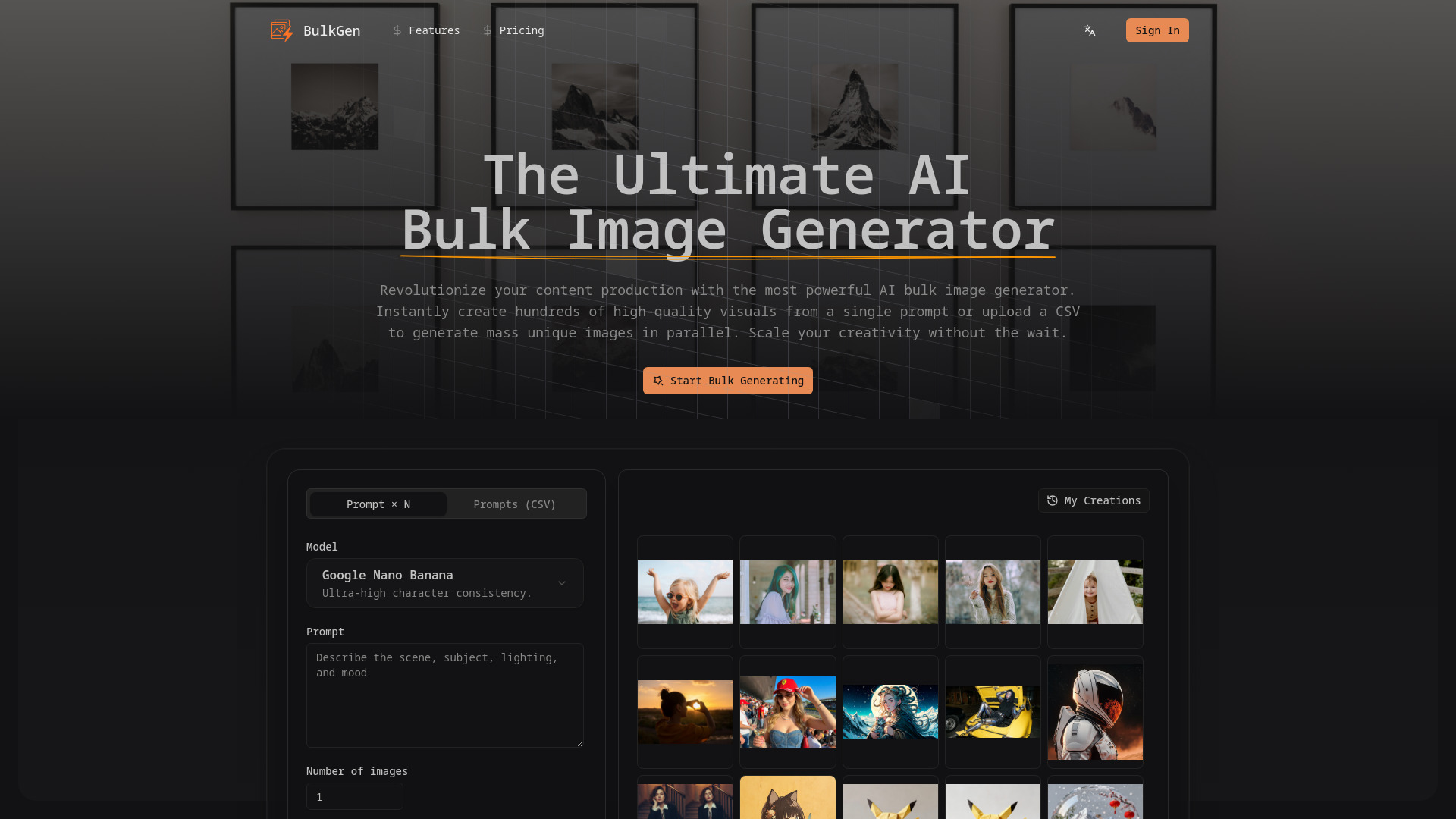
BulkGen is a cutting-edge AI bulk image generator designed to solve the bottleneck of single-image creation. It empowers users to generate mass quantities of visuals in seconds, offering two distinct modes: 'Prompt × N' for creating multiple variations of a single concept, and 'Prompts (CSV)' for processing large datasets of different descriptions simultaneously. It is the most powerful AI bulk image generator, capable of creating hundreds of high-quality visuals instantly from prompts or CSV.

How to use AI Bulk Image Generator
  1. Select Your Generation Mode: Choose 'Prompt × N' to generate multiple variations of one idea, or select 'Prompts (CSV)' to upload a spreadsheet for mass unique generation.
  2. Input Prompts or Upload CSV: Type your descriptive prompt into the text box, or simply drag and drop your .csv file containing up to 50+ prompts per batch.
  3. Configure Settings: Set your desired specific parameters. Choose the number of images per prompt, select the aspect ratio (1:1, 16:9, 9:16, etc.), and pick your output format (PNG/JPEG).
  4. Generate & Download: Click 'Generate' and watch the gallery fill up. Once complete, download your images individually or export the entire batch as a ZIP file.
Features of AI Bulk Image Generator
  • Prompt × N: Instant Variations: Input a single text prompt and specify the number of images to instantly render N unique variations.
  • CSV Upload for Mass Production: Upload a CSV file containing hundreds of distinct prompts to generate a specific image for every line.
  • Multi-Aspect Ratio Support: Supports 1:1, 9:16, 16:9, 3:4, 4:3, 3:2, 2:3, 5:4, 4:5, and 21:9 ratios.
  • Output Formats: Supports PNG and JPEG.
  • High-Speed Parallel Processing: Utilizes advanced GPU clustering to process parallel requests for lightning-speed results.
  • Ultra-High Consistency Models: Utilizes advanced models to ensure high fidelity and character consistency.
  • One-Click Bulk Export: Streamlined tools to zip and download all generated assets with organized file names.
  • Commercial Rights Included: All generated images are yours to own for commercial use.
Use Cases of AI Bulk Image Generator
  • Content Creation: Revolutionize content production by instantly creating hundreds of high-quality visuals.
  • E-commerce Assets: Generate mass unique images for product catalogs.
  • Social Media Content: Streamline the creation of visuals for social media platforms.
  • SEO Blog Posts: Generate specific images for every line in a CSV for blog content.
  • Dynamic Ad Campaigns: Automate visual pipelines for advertising.
  • Storytelling and Branding: Maintain high fidelity and character consistency across large batches for branding.
FAQ
  • How does the CSV upload feature work in the bulk image generator? The CSV processor accepts complex prompt lists and queues them for rapid generation.
  • What is the maximum number of images I can generate at once? The number of images can be set up to 200 per prompt.
  • Can I use different aspect ratios for bulk generation? Yes, the tool supports various aspect ratios including 1:1, 9:16, 16:9, 3:4, 4:3, 3:2, 2:3, 5:4, 4:5, and 21:9.
  • Is there a difference between Prompt × N and CSV mode? 'Prompt × N' generates multiple variations of one idea, while 'Prompts (CSV)' processes a spreadsheet of different descriptions for mass unique generation.
  • Do I own the commercial rights to the bulk generated images? Yes, all generated images are yours to own.
  • What file formats does the bulk image generator output? The tool outputs in PNG and JPEG formats.

Newsletter

Join the Community

Subscribe to our newsletter for the latest news and updates