What is Gemini Omini Video - 2
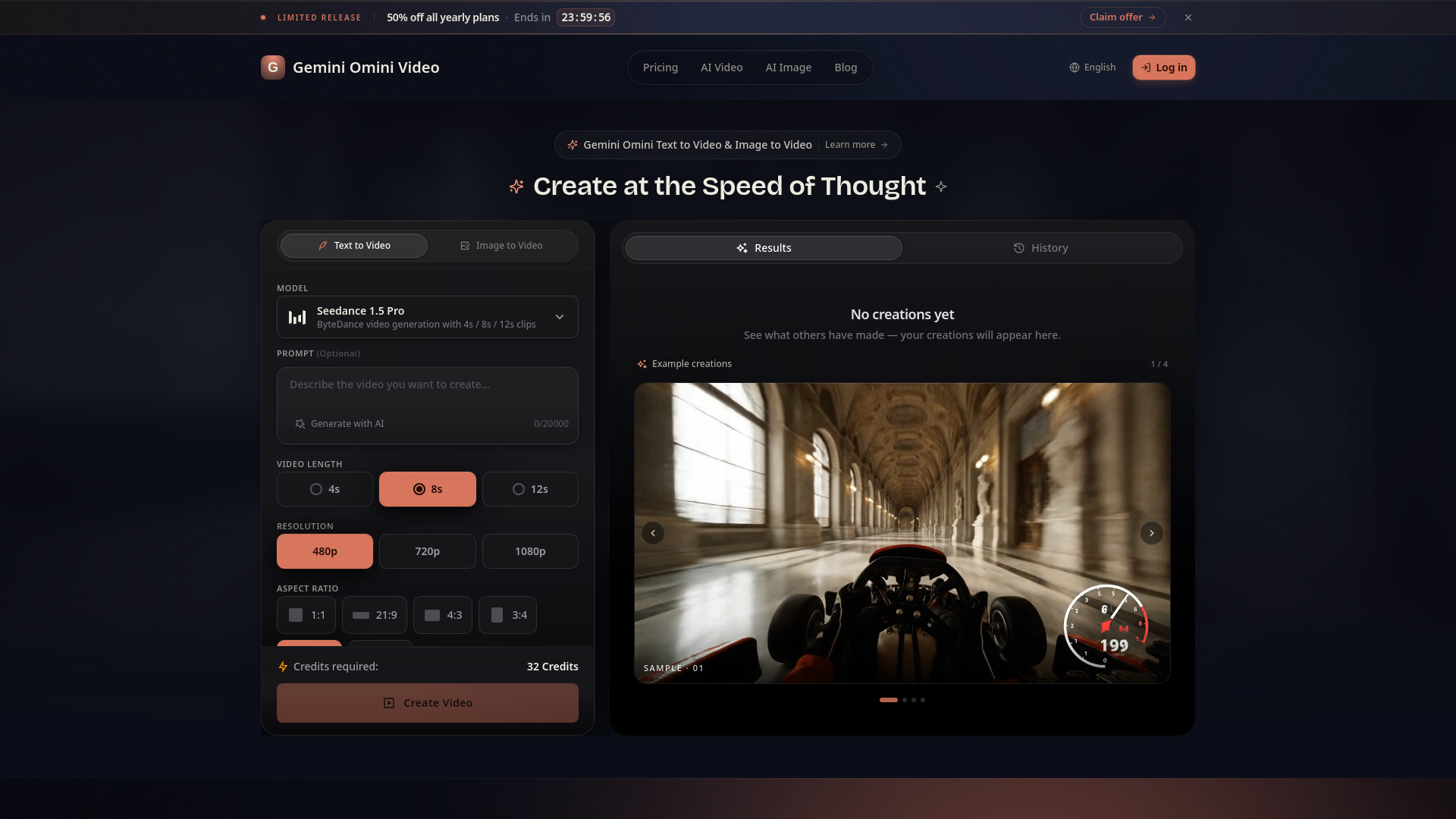
Gemini Omini Video is an AI-powered video generator that creates high-quality video clips from text prompts or reference images. It allows users to generate text-to-video and image-to-video scenes for various purposes.
How to use Gemini Omini Video - 2
- Select Input Mode: Choose between 'Text to Video' or 'Image to Video'.
- Provide Input: For 'Text to Video', enter a descriptive prompt in the text area. For 'Image to Video', upload a reference image.
- Configure Settings: Select the desired Model (e.g., Seedance 1.5 Pro), Video Length (4s, 8s, or 12s), Resolution (480p, 720p, or 1080p), and Aspect Ratio (e.g., 1:1, 16:9).
- Generate Audio (Optional): Toggle the 'Generate Audio' switch if desired.
- Advanced Options: Expand the 'Advanced' section to control Public Visibility.
- Create Video: Click the 'Create Video' button to generate the clip.
Features of Gemini Omini Video - 2
- Text-to-Video Creation: Generate video clips from text prompts.
- Image-to-Video Animation: Animate uploaded reference images into video clips.
- Model Selection: Choose from different AI models like Seedance 1.5 Pro.
- Customizable Length: Select video durations of 4s, 8s, or 12s.
- Resolution Options: Generate videos in 480p, 720p, or 1080p.
- Aspect Ratio Control: Choose from various aspect ratios including 1:1, 21:9, 4:3, 3:4, 16:9, and 9:16.
- Audio Generation: Option to generate audio for the video.
- Style Controls: Select from various styles like cinematic, anime, realistic, artistic, or minimalist.
- Flexible Formats: Generate landscape, portrait, or square clips.
- Practical Controls: Features designed for quick idea-to-clip generation.
- Public Visibility Option: Control whether creations are publicly visible.
Use Cases of Gemini Omini Video - 2
- Drafting social media clips.
- Creating campaign visuals.
- Producing product videos.
- Developing educational explainers.
- Generating game trailers.
- Creating music visuals.
- Storyboarding and concept visualization.
Pricing
- Free Tier: 5 credits per day (login to claim), standard quality output, basic AI models, community support.
- Basic Plan: $234/year (approx. $19.50/month), includes 400 credits/month, standard AI models, HD resolution, email support.
- Pro Plan: $474/year (approx. $39.50/month), includes 1,000 credits/month, all AI models, HD & 4K resolution, priority queue, priority support.
- Max Plan: $894/year (approx. $74.50/month), includes 2,300 credits/month, all AI models, 4K & 8K resolution, priority queue, dedicated support.
- One-time Purchase: Option available.
FAQ
- What is Gemini Omini Video? Gemini Omini Video is an AI video generator for text-to-video and image-to-video creation. Users can input text prompts or reference images, select settings like style, format, and duration, and generate short videos.
- Can I create Image to Video clips? Yes, you can upload a reference image, describe how it should move, and animate it into a short AI video.
- What styles does Gemini Omini Video support? The tool supports various styles including cinematic, anime, realistic, artistic, or minimalist.
- What aspect ratios and durations are available? Available aspect ratios include 1:1, 21:9, 4:3, 3:4, 16:9, and 9:16. Durations can be set to 4s, 8s, or 12s.
- How do I get better video results? The tool focuses on prompt-led generation, reference-image animation, and practical controls to help teams move from idea to usable clips quickly. Experimenting with prompts and settings is key.