What is ImageCombiner AI
ImageCombiner AI is an AI-powered tool designed for seamlessly merging and blending multiple images into one frame. It offers an advanced AI photo merger that creates natural, high-quality results without manual editing.
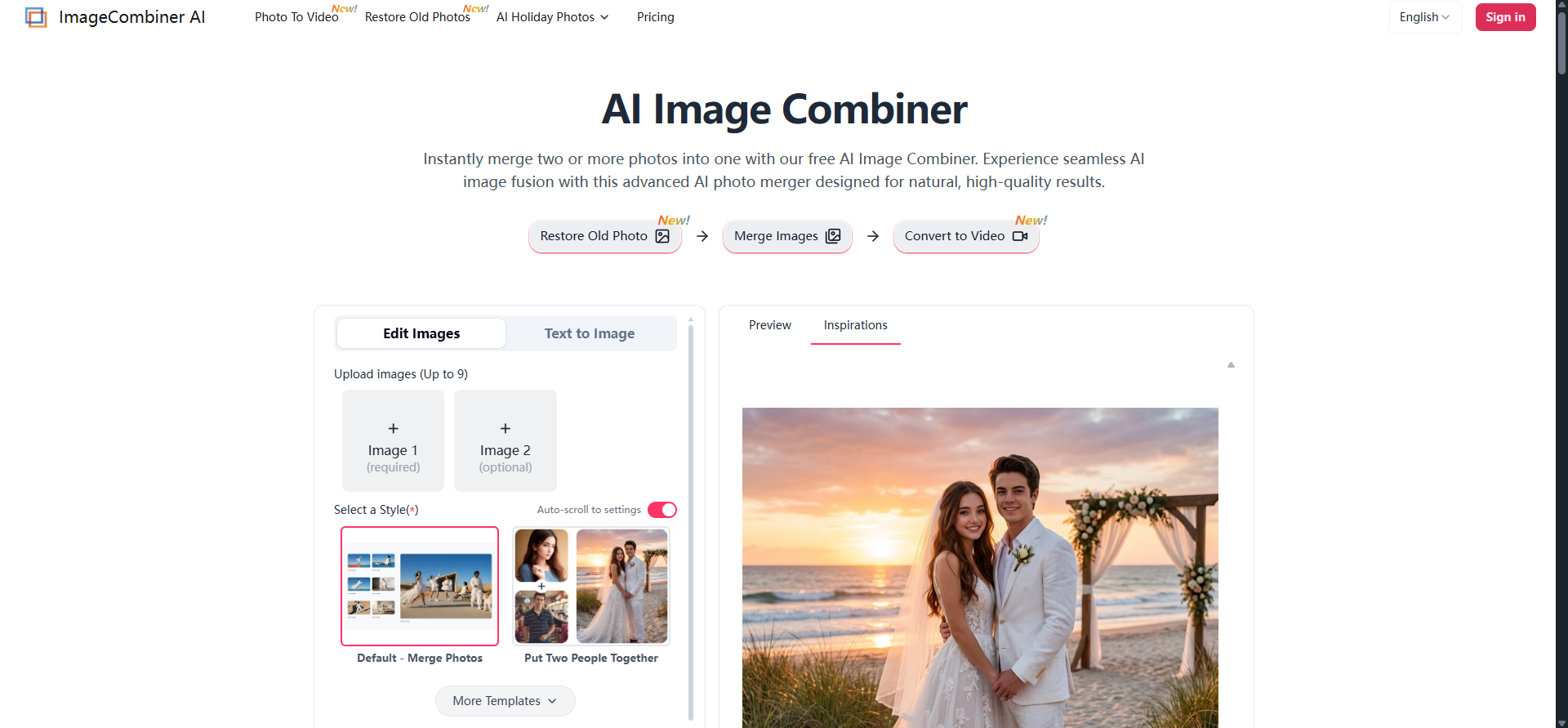
How to use ImageCombiner AI
- Upload Your Images: Select 'Add Image' to upload 1 to 9 photos. The tool supports various formats for simple stitching or complex AI blending.
- Choose a Template or Enter a Prompt: Select a specific style (e.g., 'Merge Multiple Photos', 'Put Two People Together') or type a text prompt to describe how you want the AI to merge the images.
- Generate and Download: Click 'Merge Images' to let the AI process the fusion. Preview the result and download your watermark-free image.
Features of ImageCombiner AI
- AI-Powered Merging: Seamlessly fuses two or more images using advanced AI composition technology.
- Automatic Detection: Analyzes semantic content to maintain visual consistency in lighting and texture.
- Style Transfer: Allows users to blend image styles or mimic artistic styles.
- Custom Prompts: Enables users to guide the AI with text descriptions for specific styles or atmospheres.
- Multiple Image Support: Can merge up to 9 photos simultaneously.
- Realistic Blending: Achieves natural results for image fusion, portrait consistency, and style transfer.
- No Skills Required: Designed for ease of use, automating complex blending workflows.
- Watermark-Free Downloads: Offers high-quality, watermark-free images upon purchase.
Use Cases of ImageCombiner AI
- Personal Memories: Combine two images into one frame for social content or cherished keepsakes.
- Group and Couple Photos: Merge individual photos into a single frame, adjusting lighting for reunions or portraits.
- Portrait Fusion: Mix images of faces for creative effects like predicting a baby's look or celebrity mashups.
- Fantasy and Fan Art: Blend different elements (e.g., animal species, superhero costumes) to create unique avatars and surreal concepts.
- Travel Visualization: Merge portraits with dream destinations by swapping backgrounds while maintaining realistic shadows.
- E-commerce: Generate product assets, virtual try-on for apparel, commercial product staging, smart branding mockups, and catalog consistency.
- Design and Visualization: Interior design and virtual staging, visual comparison and layouts ('Before and After'), artistic style transfer, and concept art synthesis.
Pricing
- Free Trial: Offers free starter credits for new users to merge photos, blend styles, or create collages. Previews may include a watermark.
- Paid Packs: Small packs (starting at $4.49) are available to remove watermarks and download high-resolution images.
- Premium Version: Uses an advanced engine for complex tasks like virtual try-on, interior scene construction, and high-fidelity texture mapping, offering sharper details and better consistency.
- Subscription Plans: Monthly subscription options are available, with potential savings.
- Pay As You Go: A one-time purchase option is also available.
- Commercial License: Included with all plans, allowing commercial use of unlocked images.
FAQ
- What makes ImageCombiner AI different from other photo joiners? It combines flexibility with professional control, supporting 1-9 images, template-based layouts, AI prompt-driven fusions, and accurate results for portraits and style transfer. It offers free previews and affordable watermark removal.
- Can I merge two photos with AI Image Combiner for free? Yes, free starter credits are provided for new users to merge photos, blend styles, or create collages. Affordable premium plans are available for high-resolution generation and advanced models.
- Will there be a watermark on my combined images? Free trials may generate previews with a watermark. Watermark-free downloads are available upon purchase.
- What is the difference between the Basic and Premium Models? The Basic version is suitable for standard photo stitching and blending. The Premium version uses an advanced engine for complex tasks like virtual try-on and detailed scene construction, offering higher realism and consistency.
- How do I control the image merging process? After uploading photos, users can choose a template or enter text prompts to guide the AI for precise layouts or creative fusions.
- Can I combine more than two images at once? Yes, the tool supports uploading up to 9 photos simultaneously for creating complex scenes and effects.
- Is this AI Photo Combiner suitable for commercial use like e-commerce? Yes, unlocked images have full commercial rights. The premium version is recommended for professional e-commerce needs requiring high realism and accuracy.
- Do I need to sign up to use the AI Photo Combiner tool? Yes, sign-up is required to access features, secure credits, and save image history. Registration unlocks free welcome credits.