What is kinovi - Seedance 2.0 - Real Man AI Video
Kinovi is a free AI video generator powered by Seedance 2.0. It supports generating videos from text, images, and real human models. The platform offers a free trial with 200 credits and allows commercial use without watermarks.
How to use kinovi - Seedance 2.0 - Real Man AI Video
- Upload References: Add up to 9 images, 3 videos (total length up to 15s), and 3 audio clips (total length up to 15s) to guide the style, motion, and rhythm of your video.
- Tag & Describe: Use
@filenames in your prompt to assign specific roles to your uploaded references (e.g., first frame, camera motion, sound). Describe the desired video motion in the provided text area. - Generate, Extend, Edit: Choose a clip duration between 4-15 seconds and generate your video. You can then extend or edit the clip with new instructions.
Features of kinovi - Seedance 2.0 - Real Man AI Video
- Seedance 2.0 Engine: Utilizes an advanced AI video generation model.
- Multimodal Input: Supports text-to-video, image-to-video, audio-to-video, and video extension.
- Real Human Models: Capable of generating videos with realistic human characters.
- High Resolution: Generates videos up to 2K resolution.
- Native Audio Generation: Creates audio, including lip-sync in multiple languages, directly with the video.
- Character Consistency: Maintains visual identity of characters across different shots and camera angles.
- Camera Controls: Offers text-based camera controls (zoom, pan, tilt, track, orbit) and the ability to drive camera movement from reference videos.
- Video Editing: Allows editing existing videos by describing desired changes without regenerating the entire video.
- Fast Generation: Cinema-grade 2K videos generate in under 60 seconds.
- Free Trial: New users receive 200 free credits.
- No Watermark: Generated videos are free of watermarks.
- Commercial Use: Licensed for commercial projects.
Use Cases of kinovi - Seedance 2.0 - Real Man AI Video
- UGC Ads: Create user-generated content style advertisements.
- Talking Heads: Generate videos of AI characters speaking.
- Multi-shot Storytelling: Create sequential video clips with consistent characters.
- Marketing Content: Produce promotional videos for social media, YouTube, etc.
- Educational Materials: Develop training or instructional videos.
Pricing
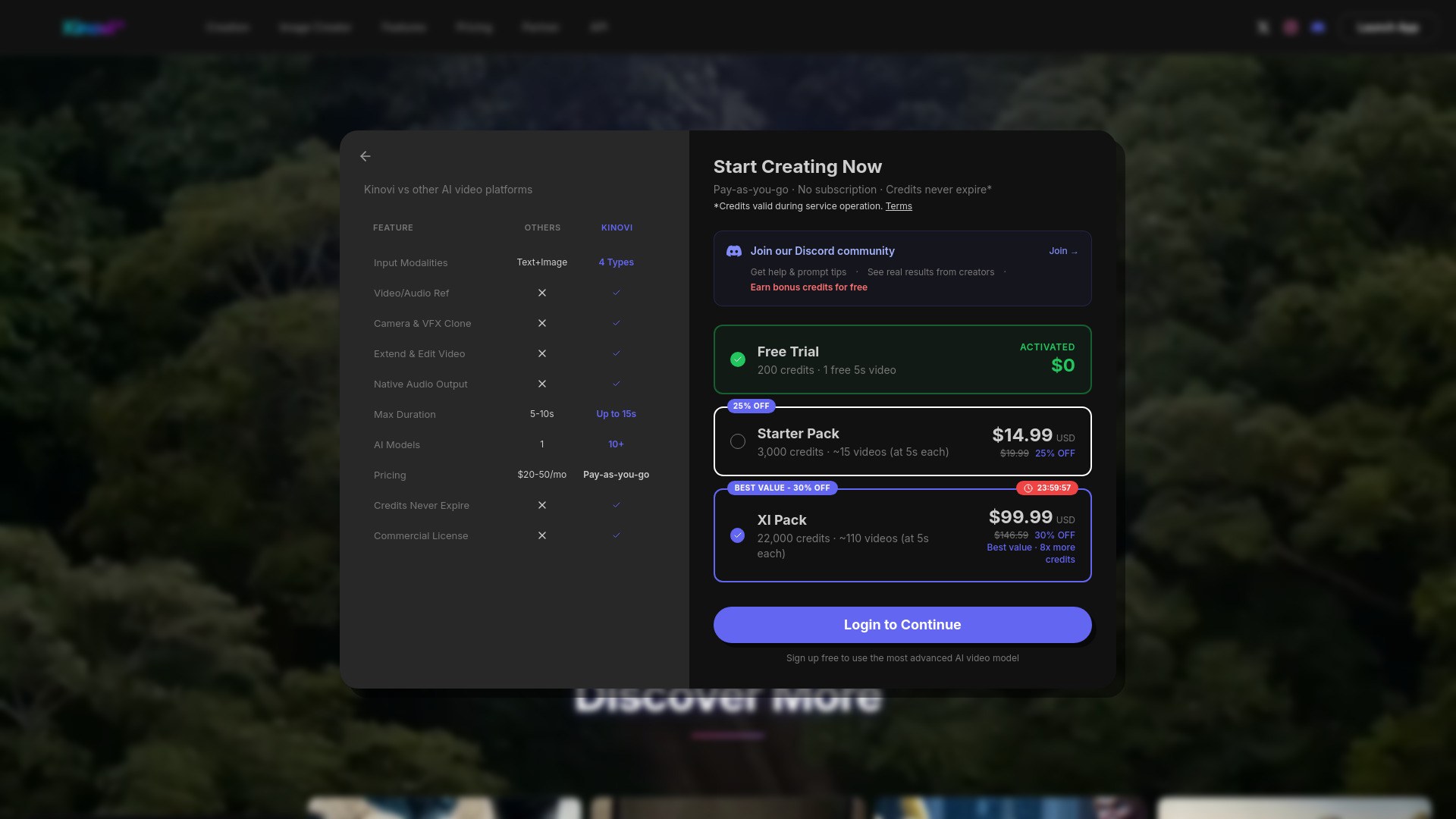
- Free: 200 credits on sign up. Includes all AI generation features, no watermark, and API access. Approximately 1-2 Seedance2.0 Pro 5s videos or 1-2 Seedance2.0 Fast 5s videos. ~0.16/sec for AI video.
- XL Pack: $114.00 (20% off original $142.50) for 22,000 credits. Includes 5 concurrent generations, 4K resolution support, no watermark, and API access. Never expires.
- Starter Pack: $17.99 for 3,000 credits. Includes 2 concurrent generations, no watermark, and API access. Never expires.
FAQ
- What is Kinovi? Kinovi is a next-generation multimodal AI video model that generates cinematic video clips up to 2K resolution with native audio from text, images, video clips, and audio inputs.
- How is Kinovi different from Sora, Runway, or Kling? Kinovi supports four input modalities (text, image, video, audio), allowing users to lock composition with photos, drive camera motion with clips, and sync rhythm with audio. It also generates audio natively alongside video.
- What input modes does Kinovi support?
Text-to-Video, Image-to-Video, Audio-to-Video, and Video Extend. Up to 12 files (9 images, 3 videos, 3 audio tracks) can be combined in a single generation using
@filesyntax. - What resolution and duration can I generate? Up to 2K resolution at various aspect ratios (16:9, 9:16, 4:3, 1:1, 21:9). Each clip is 4-15 seconds, and segments can be chained for longer stories.
- How does character consistency work across shots? Kinovi locks facial features, clothing, and body proportions across different camera angles and scenes, allowing for visual consistency throughout a story.
- Does Kinovi generate audio automatically? Yes, audio (Foley effects, ambient sounds, lip-sync) is generated natively with the video. Users can also upload their own voiceover or soundtrack for synchronized visuals.
- Can I edit existing videos with natural language? Yes, users can upload a clip and describe changes (e.g., swap a character, adjust an action) without regenerating the entire video.
- What camera controls are available? Full camera control via text prompts (zoom, pan, tilt, track, orbit) and the option to use a reference video for exact camera movement.
- How fast is video generation? Cinema-grade 2K videos generate in under 60 seconds, with optimized pipelines for near-real-time results for shorter clips.
- Is Kinovi free to use? Yes, new users receive free credits upon signing up, with no credit card required. Affordable credit packs are available.
- Can I use generated videos for commercial projects? Yes, videos created with Kinovi can be used for commercial purposes, subject to the terms of service.
- Who is Kinovi designed for? Filmmakers, content creators, marketing teams, educators, and anyone needing professional video from prompts, for platforms like TikTok, YouTube, or product ads.
- Is this an official product? Kinovi provides its own interface for accessing AI video generation, making it accessible globally without regional restrictions.