LogoTopAIHubs
icon of MakeAIVideo

MakeAIVideo

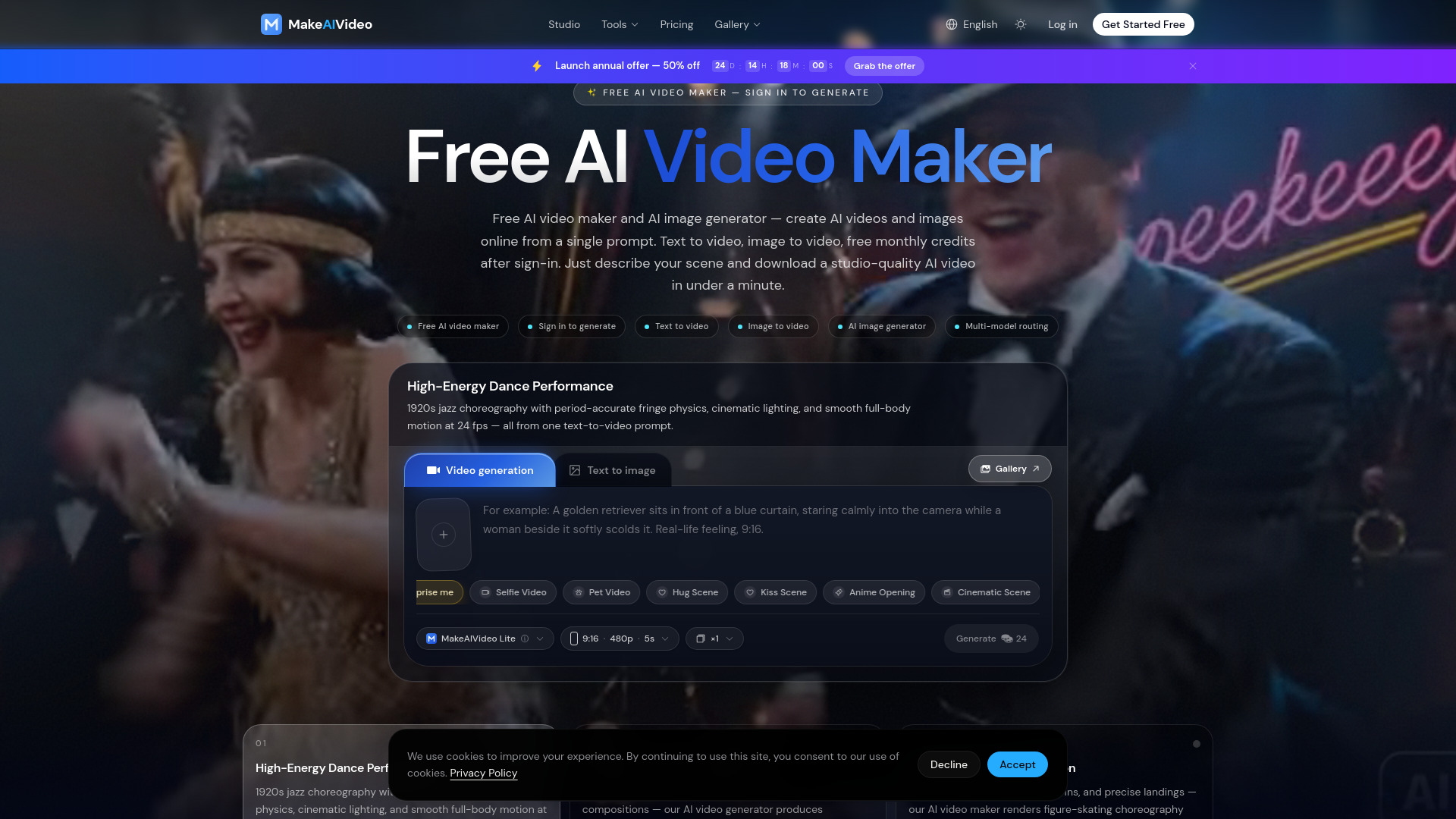
A multi-model AI video and image generator for creating professional-quality cinematic content.

Introduction

What is MakeAIVideo

MakeAIVideo is a free AI video maker and AI image generator that allows users to create professional-quality cinematic content from text prompts. It supports text-to-video, image-to-video, and offers free monthly credits upon sign-in.

How to use MakeAIVideo
  1. Go to the Studio.
  2. Type a text prompt describing your scene.
  3. Pick your settings (ratio, duration, resolution).
  4. Hit Generate.
  5. Sign in to generate and receive free monthly credits.
Features of MakeAIVideo
  • Free AI video maker and AI image generator.
  • Text to video and image to video capabilities.
  • Free monthly credits after sign-in.
  • Studio-quality AI videos generated in seconds.
  • Supports various aspect ratios (16:9 landscape, 9:16 portrait, 1:1 square).
  • AI video generation with synchronized sound effects (dialogue, ambient audio, foley).
  • AI image generation up to 4K resolution.
  • Multi-model routing to select the best AI model for prompts.
  • Reference images can be used for AI video generation.
  • Features like complex motion, realistic physics, and detailed sound design.
  • Commercial use is permitted on paid plans.
Use Cases of MakeAIVideo
  • Creating professional-quality cinematic content.
  • Generating product hero shots, dynamic transitions, and brand-safe compositions for ads and e-commerce.
  • Producing figure-skating choreography with full body coordination.
  • Extending existing video clips with new camera angles and scenery.
  • Creating AI videos with synchronized sound effects and detailed micro-sounds.
  • Generating narrative sequences and storyboards with consistent characters and actions.
  • Producing YouTube intros and social media content.
Pricing

MakeAIVideo offers a tiered pricing structure:
  • Free Plan: Includes monthly credits, access to standard models, no credit card required. Allows up to 1080p video, 5-10s video length, audio sync, 2K image resolution, Lite model, and personal use.
  • Pro Plan: Priced at $10.00/month (billed yearly, with a launch offer of 50% off). Includes 800 credits/month, up to 1080p video, 4K image resolution, Lite + Pro models, batch generation (×4), commercial use, no watermark, and 30 priority queue credits/month.
  • Ultra Plan: Priced at $20.00/month (billed yearly, with a launch offer of 50% off). Includes 2000 credits/month, everything in Pro, all models including Ultra, multi-model routing, 200 priority queue credits/month, storyboard & scripting (coming soon).
FAQ
  • Why subscribe to this AI video maker? Subscriptions support development and unlock benefits like watermark-free downloads, priority queue access, higher resolution output (up to 4K), and access to premium AI video models.
  • Can I upgrade or cancel anytime? Yes, subscriptions can be upgraded or canceled with a one-click process from the billing page.
  • Can I get a refund? Sales are non-refundable, but credits are automatically refunded if an AI video generation fails.
  • Are you going to raise prices? Pricing may be adjusted as new models and features are added, but annual plan prices are honored for the full year.
  • Do I get higher AI video quality if I subscribe? Yes, Pro and Ultra plans offer more credits and access to premium models for heavier production needs.
  • Can I use AI videos commercially? Paid plan content (Pro, Ultra) is available for any commercial purpose without attribution. Free plan content is for personal, non-commercial use only.
  • What AI video formats are supported? Supported formats include YouTube (16:9 landscape), TikTok and Instagram Reels (9:16 portrait), and Instagram feed (1:1 square).
  • How long does the AI video maker take to generate a video? Most AI videos generate in 30–90 seconds, depending on length, resolution, and model tier. Subscribers benefit from priority queue access.
  • Is this AI video maker free to use? Yes, the free plan includes monthly credits and access to standard models. Paid plans (Pro, Ultra) are available for more extensive use.
  • How do I make AI videos for free? Go to the Studio, type a text prompt, select settings, and generate. Signing in provides free monthly credits.
  • Can I make AI videos with sound for free? Yes, the audio option can be toggled in settings, and AI-generated synchronized sound effects are available on all plans, including the free tier.
  • Does MakeAIVideo also work as an AI image generator? Yes, MakeAIVideo functions as a powerful AI image generator, creating images from text prompts up to 4K resolution.

Newsletter

Join the Community

Subscribe to our newsletter for the latest news and updates