What is Nimbalyst
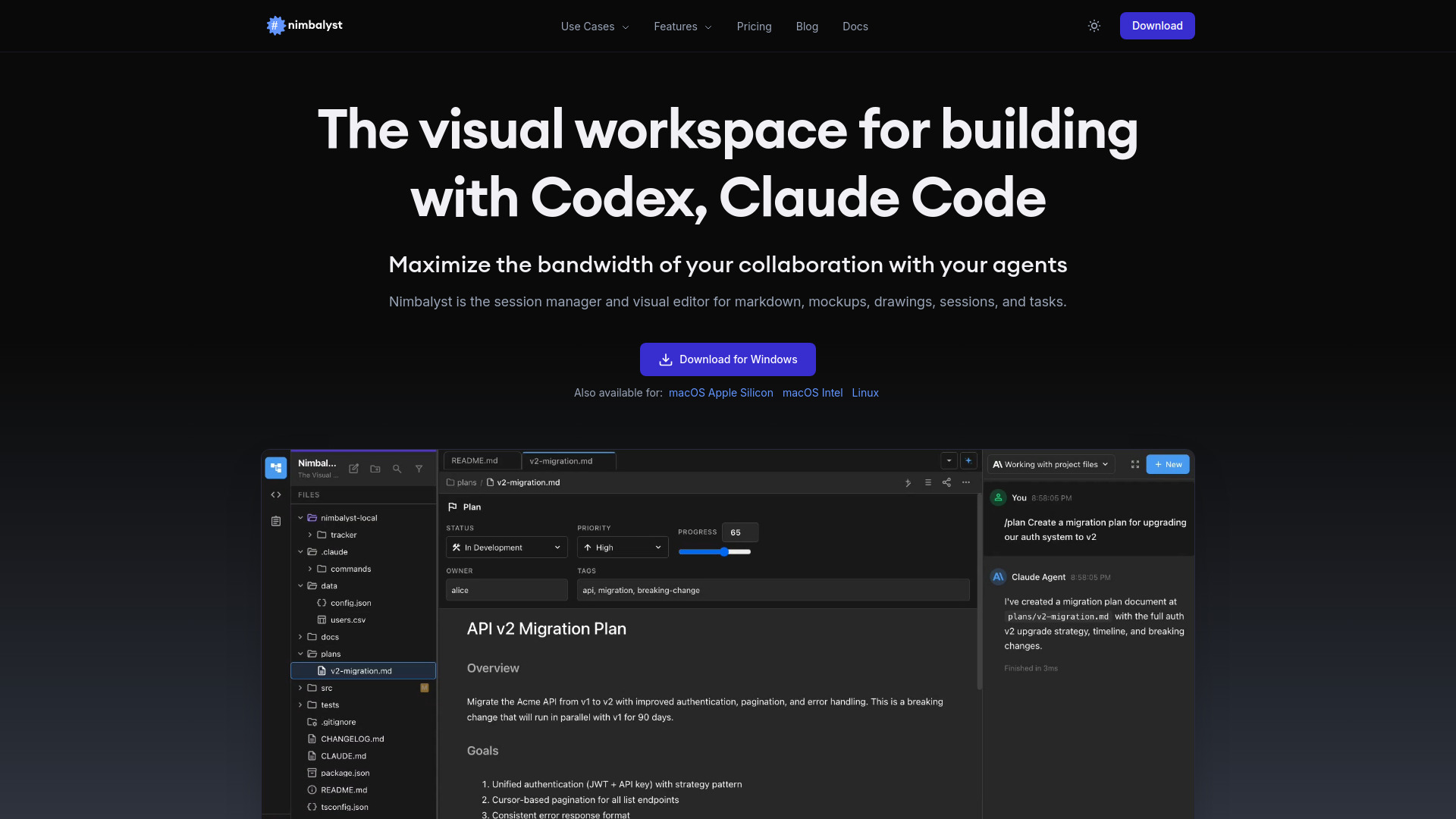
Nimbalyst is a visual workspace and session manager designed for building with AI agents like Claude Code and Codex. It serves as a visual editor for various file types including markdown, mockups, drawings, code, data models, and CSVs, aiming to enhance collaboration and productivity with AI agents.
How to use Nimbalyst
While a detailed step-by-step guide is not explicitly provided, the content suggests the following usage pattern:
- Download and install Nimbalyst on your operating system (macOS, Windows, Linux).
- Utilize the visual editors for different file types (Markdown, CSV, Mockup, Code, Excalidraw, Data Model, Mermaid).
- Interact with AI agents like Claude Code and Codex within the workspace.
- Manage AI sessions using a Kanban board.
- Review and approve AI-generated edits to files.
- Track tasks and projects within the built-in task management system.
- Use the mobile app to monitor sessions on the go.
Features of Nimbalyst
- Visual Workspace: A unified environment for building with AI agents.
- Session Manager: Organize and manage AI agent sessions.
- Visual Editors: Dedicated editors for Markdown, CSV, Mockups, Code, Excalidraw diagrams, Data Models, and Mermaid diagrams.
- AI Agent Integration: Supports Claude Code (Anthropic) and Codex (OpenAI).
- Kanban Board: Visualize and manage AI sessions on a Kanban board.
- Task Management: Built-in system to track plans, blogs, bugs, and other tasks.
- File Edits Sidebar: Review and manage files modified by AI agents.
- AI Git Commit: Feature for developers to manage Git commits with AI assistance.
- Mobile App: Available for iOS to monitor and interact with sessions remotely.
- Cross-Platform: Desktop applications for macOS, Windows, and Linux.
- Context-Aware Editing: AI agents understand the full project context when editing files.
- Real-time Collaboration: Iterate on work with AI agents in real-time.
Use Cases of Nimbalyst
- Developers: Building with AI agents, managing code, reviewing AI edits, using AI Git commits.
- Product Managers: Planning PRDs, discovery, prototypes, and managing tasks.
- Designers: Creating wireframes and mockups, iterating with AI, generating code from designs.
- Content Creators: Writing and editing markdown files with AI assistance.
- Data Analysts: Editing CSV data and performing AI-powered data transformations.
Pricing
Nimbalyst is free for individual use, with no feature limits or trial periods for the core experience.
FAQ
- What is Nimbalyst? Nimbalyst is the visual workspace for building with Codex and Claude Code. It's a session manager and visual editor for markdown, mockups, drawings, sessions, and tasks — plus code, data models, and CSVs. Free for individual use.
- Is Nimbalyst free? Yes. The core Nimbalyst experience is completely free for individual users with no feature limits or trial period.
- What AI agents does Nimbalyst support? Nimbalyst supports Claude Code (by Anthropic) and Codex (by OpenAI). You can run multiple sessions in parallel, manage them on a kanban board, and review all agent file changes in one place.
- What platforms does Nimbalyst run on? Nimbalyst is available as a desktop app for macOS (Apple Silicon and Intel), Windows, and Linux. There is also an iOS mobile app for managing agent sessions on the go.