What is Project Genie
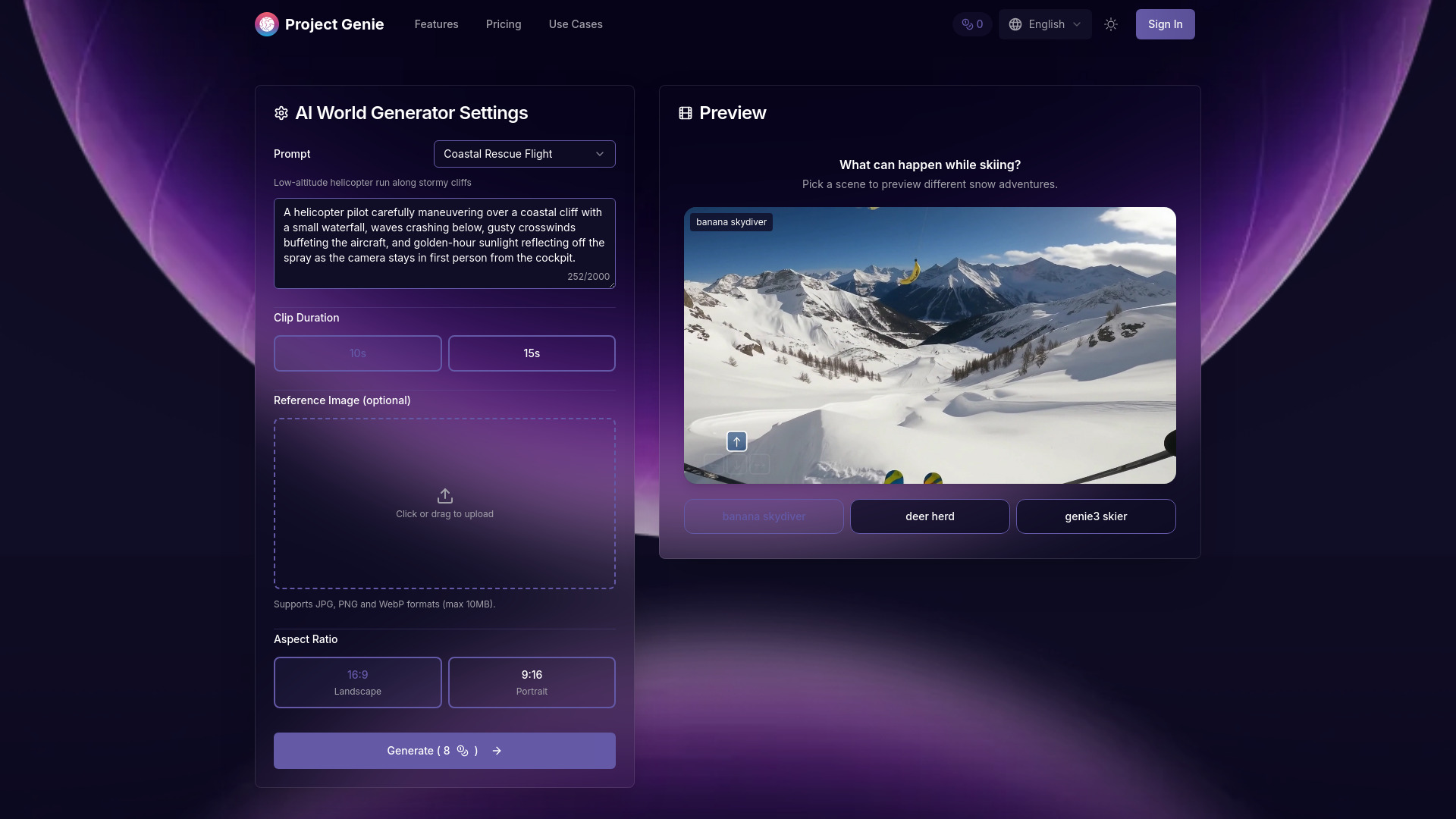
Project Genie is an AI-powered platform that leverages Google's Genie 3 technology to create photorealistic, interactive 3D worlds from text descriptions. It allows users to generate navigable 3D environments in real-time without requiring design skills.
How to use Project Genie
- Define Your Character: Describe the character exploring your world, including perspective (first-person, third-person), movement style (walking, flying, driving), and visual appearance.
- Design Your Environment: Write text prompts describing the world setting. Upload reference images to guide generation. Project Genie interprets inputs using Gemini to create detailed environment descriptions.
- Preview with Nano Banana Pro: Review AI-generated preview images of your world. Make adjustments to prompts and images before committing to full world generation.
- Generate & Navigate: Click generate to create your interactive world. Explore in real-time as the platform generates paths ahead. Adjust camera angles, download videos, and remix into new variations.
Features of Project Genie
- Text-to-World Generation: Transforms text descriptions into explorable 3D environments with consistent physics.
- Image-Based World Sketching: Analyzes uploaded reference images to incorporate elements into generated environments.
- Real-Time Interaction: Navigate worlds at 20-24 frames per second with dynamic environment generation.
- World Remixing System: Modify existing worlds or combine elements to create variations.
- Photorealistic Quality: Renders worlds at 720p resolution with photorealistic lighting and textures.
- Cross-Platform Web Access: Accessible from any device with a web browser, no downloads required.
Use Cases of Project Genie
- Game Prototyping: Rapidly visualize game environments and test gameplay scenarios.
- Educational Simulations: Create interactive learning environments for historical settings, scientific scenarios, and virtual field trips.
- Film and Animation Previsualization: Generate scene environments for prototyping locations and blocking.
- Architecture and Urban Planning: Visualize architectural concepts and urban designs for presentations.
- AI Research and Training: Generate diverse environments for training AI agents.
- Creative Storytelling: Build explorable settings for interactive narratives.
Pricing
- Free: $0/month - Includes 20 credits, 2 world generation sessions, and standard quality environments.
- Professional: $9.9/month - Includes 500 credits per month, up to 62 sessions, high-quality 720p environments, and a commercial use license.
- Enterprise: $39.9/month - Includes 5000 credits per month, up to 625 sessions, premium 720p photorealistic quality, and a commercial use license.
FAQ
- What is Project Genie and how does it work?: Project Genie is an AI-powered world generation platform using Google's Genie 3 model. It transforms text and images into photorealistic, interactive 3D environments generated in real-time at 20-24 FPS with consistent physics.
- Do I need 3D modeling or coding skills?: No, Project Genie is designed for all skill levels. Text prompts and image uploads are used, and the AI handles all technical aspects.
- How quickly are worlds generated?: Worlds generate in real-time as you explore, operating at 20-24 FPS. Initial setup takes seconds.
- Can I use generated worlds commercially?: Yes, premium subscribers receive a commercial use license for game development, education, film previsualization, architectural visualization, and other commercial applications.
- What types of worlds can I create?: Diverse environments including game levels, historical settings, architectural spaces, natural landscapes, sci-fi, and fantasy worlds are supported. Exploration modes include walking, driving, and flying.
- What's your refund policy?: A 7-day refund policy is offered. Full refunds are available within 7 days if less than 50% of credits have been used.