LogoTopAIHubs
icon of Video to Text AI

Video to Text AI

AI-powered tool for fast, accurate video-to-text transcription and subtitle generation in 55+ languages.

Introduction

What is Video to Text AI

Video to Text AI is an advanced automatic transcription technology that converts spoken words in videos into accurate written text. It utilizes state-of-the-art machine learning and speech recognition algorithms to analyze audio tracks, identify different speakers, and generate time-stamped transcripts with high precision. It works with any video format, including YouTube videos, podcasts, meeting recordings, and educational content.
How to use Video to Text AI
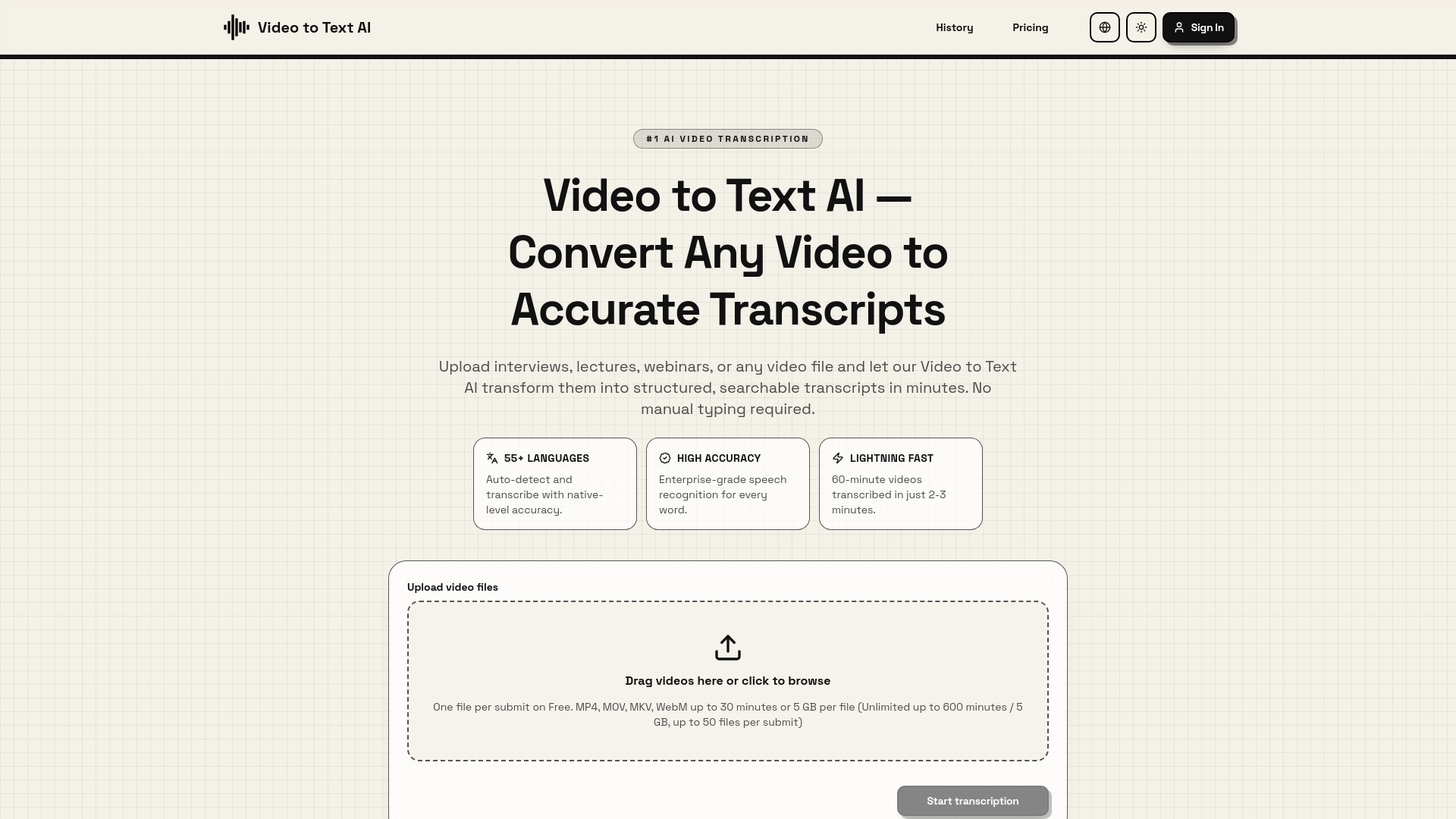
  1. Upload Your Video: Upload video files (MP4, MOV, MKV, WebM) or paste a YouTube URL. The tool accepts files up to 2GB and videos up to 4 hours long. You can drag and drop or click to browse.
  2. AI Processes Your Content: The Video to Text AI engine analyzes your audio using speech recognition. It automatically detects the language, identifies speakers, and generates accurate timestamps.
  3. Download Your Transcript: Within minutes, the conversion is complete. Download in multiple formats: plain text, SRT for subtitles, or VTT for web videos. You can also edit online or export directly.
Features of Video to Text AI
  • 55+ Languages Supported: Auto-detects and transcribes with native-level accuracy.
  • High Accuracy: Enterprise-grade speech recognition for every word.
  • Lightning Fast: Transcribes 60-minute videos in 2-3 minutes.
  • Content Accessibility: Generates accurate captions compliant with accessibility standards.
  • SEO Boost: Creates searchable transcripts to improve content discoverability.
  • Content Repurposing: Enables creation of blog posts, social media snippets, and more from video transcripts.
  • Multiple Export Formats: Supports plain text, SRT, and VTT.
  • Online Editing: Allows for editing transcripts directly on the platform.
Use Cases of Video to Text AI
  • Content Creators & YouTubers: Transform video content into blog posts, show notes, and social media snippets; repurpose content across platforms and improve SEO.
  • Researchers & Academics: Transcribe interviews, lectures, and research recordings with academic-grade accuracy, preserving technical terminology and providing timestamps for citation.
  • Business Professionals: Convert meeting recordings, webinars, and training videos into searchable documents for documenting decisions and building knowledge bases.
  • Accessibility & Compliance: Make video content accessible to deaf and hard-of-hearing audiences by generating accurate captions that meet ADA, WCAG, and other accessibility standards.
FAQ
  • How accurate is Video to Text AI transcription? The webpage highlights "High Accuracy" with "Enterprise-grade speech recognition for every word."
  • What video formats does Video to Text AI support? Supports MP4, MOV, MKV, WebM.
  • How long does Video to Text AI take? 60-minute videos are transcribed in 2-3 minutes.
  • What languages does Video to Text AI support? Supports 55+ languages, including English, Spanish, French, German, Italian, Portuguese, Chinese (Mandarin & Cantonese), Japanese, Korean, and many more. It also features automatic language detection.
  • What export formats are available? Plain text, SRT, and VTT.
  • Can I edit the transcript after processing? Yes, transcripts can be edited online.
  • Is there a file size or duration limit? Accepts files up to 2GB and videos up to 4 hours long. Free tier mentions limits of up to 30 minutes or 5 GB per file, with unlimited up to 600 minutes / 5 GB, up to 50 files per submit.
  • Can I transcribe YouTube videos directly? Yes, you can paste a YouTube URL.
  • Does Video to Text AI add timestamps? Yes, it generates time-stamped transcripts.
  • What if the audio quality is poor? The webpage mentions "Enterprise-grade speech recognition for every word," implying robustness, but does not detail specific handling of poor audio quality.
  • Do I need to create an account? The webpage mentions "Loading session" and an "AuthButton," suggesting account creation or login may be required for full functionality.

Newsletter

Join the Community

Subscribe to our newsletter for the latest news and updates