LogoTopAIHubs
icon of Vocova

Vocova

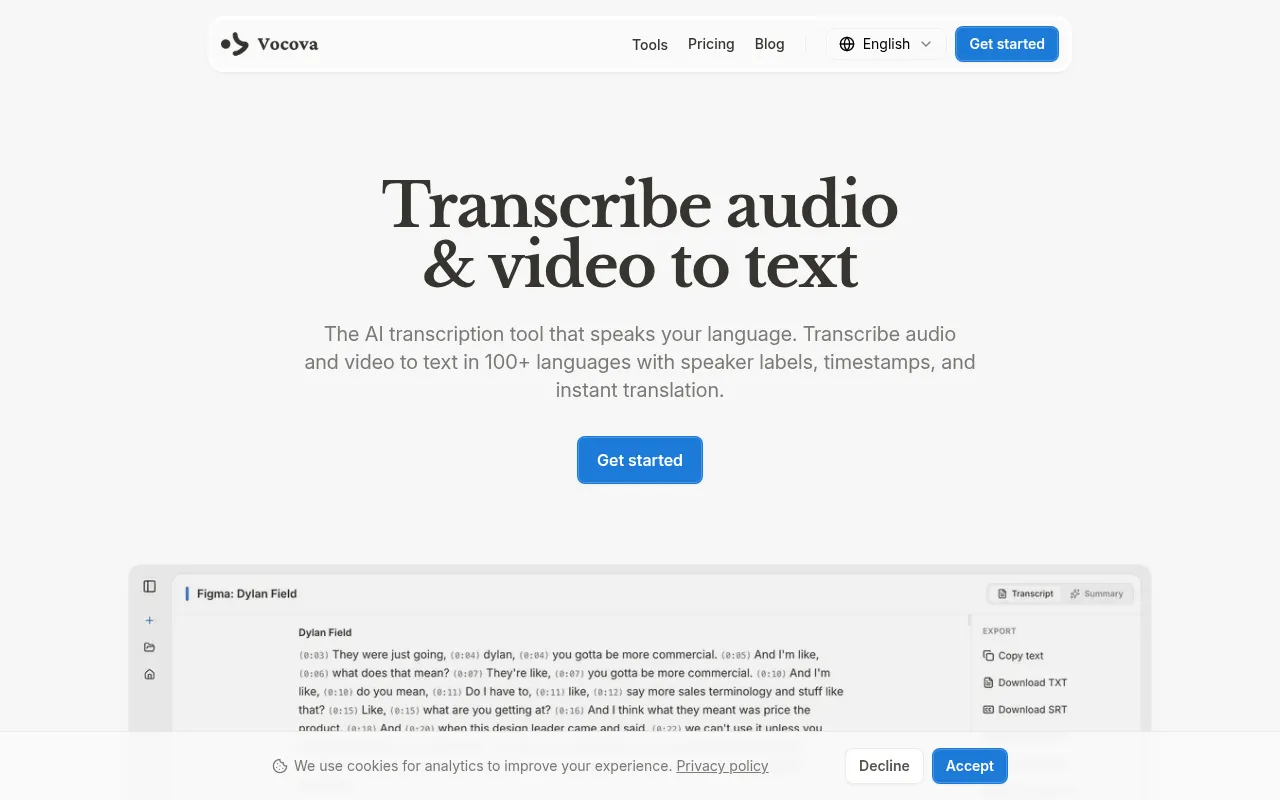
AI-powered transcription converting audio and video into editable, accurate text in 100+ languages instantly.

Introduction

What is Vocova

Vocova is an AI-powered transcription service that converts audio and video into editable, accurate text. It supports over 100 languages for transcription and can translate content into more than 145 languages.
How to use Vocova
  1. Upload or Paste URL: Upload an audio or video file, or paste a link from platforms like YouTube, TikTok, and over 1,000 others.
  2. AI Transcribes: The AI processes the audio and generates an accurate transcript with speaker labels and timestamps.
  3. Edit and Export: Review and edit the transcript, then export it in various formats like PDF, DOCX, SRT, VTT, TXT, or CSV.
Features of Vocova
  • AI-Powered Transcription: Utilizes advanced speech recognition models for high accuracy.
  • Multi-Language Support: Transcribes in over 100 languages with auto-detection.
  • Speaker Identification: Automatically detects and labels different speakers.
  • Timestamping: Provides precise word-level timestamps.
  • Translation: Translates transcripts into over 140 languages.
  • Bilingual Export: Offers side-by-side export of original and translated text.
  • Multiple Export Formats: Supports PDF, DOCX, SRT, VTT, TXT, and CSV.
  • URL Import: Imports audio/video from over 1,000 platforms by pasting a link.
  • Cloud Storage: Transcripts and audio are stored securely in the cloud.
  • AI Summaries: Generates summaries with key takeaways from the audio.
  • Online Editor: Allows inline editing of text, speakers, and timestamps.
  • Cross-Device Compatibility: Works on desktop, tablet, and phone browsers.
Use Cases of Vocova
  • Meetings: Transcribe meetings into searchable notes with action items.
  • Interviews: Transcribe interviews to capture critical quotes.
  • Podcasts: Transcribe episodes into show notes and searchable text.
  • Education: Transcribe lectures and courses for students.
  • Content Creation: Transcribe video and audio for repurposing content.
  • Legal: Transcribe depositions and court proceedings.
  • Sales: Transcribe sales calls for deal intelligence.
  • Medical: Transcribe clinical documentation.
Pricing
  • Free Plan: Offers 120 minutes of transcription, AI-generated summaries, and TXT export. No credit card required.
  • Pro Plan: Includes 3,000 minutes per month, speaker identification, translation to 140+ languages, additional export formats (PDF, DOCX, SRT, VTT, CSV), bilingual export, and larger file uploads (up to 5 GB).
FAQ
  • How do I transcribe audio to text? Upload an audio file or paste a URL. Supported audio formats include MP3, WAV, M4A, and more. You can also paste links from YouTube, TikTok, Google Drive, and over 1,000 other platforms. Vocova's AI processes the recording and delivers a full transcript with timestamps.
  • Can I convert video to text? Yes. Vocova extracts the audio track from video files and transcribes it. Supported video formats include MP4, MOV, AVI, and more. You can also paste video URLs from platforms like YouTube, TikTok, and Vimeo.
  • How accurate is AI transcription? Vocova uses state-of-the-art speech recognition models for high accuracy across various accents and speaking conditions. An editor is included to review and refine transcripts.
  • Can I transcribe audio to text for free? Yes, the Free plan includes 120 minutes of transcription with timestamps, AI summaries, and TXT export. No credit card is needed.
  • How many languages does Vocova support? Vocova supports transcription in over 100 languages and translation into over 140 languages. It can auto-detect the spoken language or allow manual selection.
  • Does Vocova identify different speakers? Yes, Vocova automatically detects and labels each speaker in the recording. This feature is available on the Pro plan.
  • Can I generate subtitles from audio or video? Yes, transcripts can be exported as SRT or VTT files, which can be used as subtitles. This feature is available on the Pro plan.
  • What platforms can I import audio and video from? Vocova supports URL import from over 1,000 platforms including YouTube, TikTok, Vimeo, Bilibili, Instagram, Facebook, SoundCloud, Google Drive, Dropbox, and Loom.
  • What export formats are available? Pro users can export as TXT, PDF, DOCX, SRT, VTT, and CSV. The free plan includes TXT export. Transcripts can also be copied to the clipboard or shared via a link.
  • What is the difference between Free and Pro? The Free plan offers 120 minutes of transcription, AI summaries, and TXT export. Pro adds 3,000 minutes per month, speaker identification, translation, additional export formats, bilingual export, and larger file uploads.
  • Is my transcription data private and secure? Yes, files are encrypted during upload and storage. Users can delete their data at any time, and it is not shared with third parties.
  • Does Vocova generate summaries? Yes, Vocova's AI automatically generates a concise summary with key points from the audio or video. This is available on both Free and Pro plans.
  • Can I export bilingual transcripts? Yes, when translating a transcript, Vocova allows exporting a bilingual side-by-side version. This is available on the Pro plan.

Information

Newsletter

Join the Community

Subscribe to our newsletter for the latest news and updates