LogoTopAIHubs
icon of HowToPose AI

HowToPose AI

AI tool for adjusting poses, swapping outfits, and editing professional portrait photos and videos.

Introduction

What is HowToPose AI

HowToPose.ai is an AI-powered tool designed to enhance visual content by allowing users to adjust poses in photos, design dynamic actions for videos, swap outfits, and edit professional portrait photos. It aims to streamline the creative workflow for visual content creation.
How to use HowToPose AI
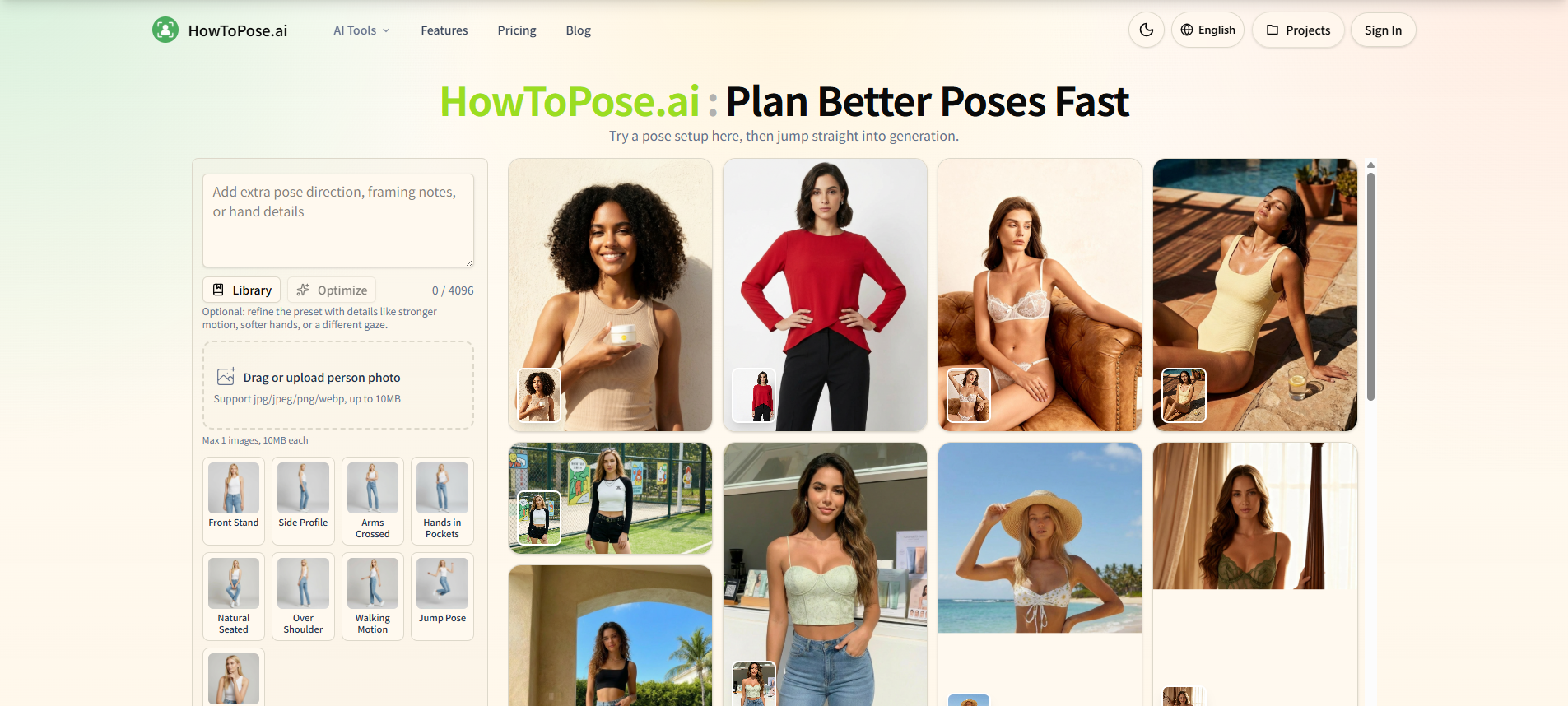
  1. Upload or Prompt: Start by uploading a person's photo or providing a text prompt.
  2. Select Style/Direction: Choose from various pose styles and directions (e.g., Front Stand, Side Profile, Arms Crossed, Natural Seated Pose, Walking Motion, Close-up).
  3. Refine with Details: Optionally, add extra pose direction, framing notes, or hand details in the prompt area to further guide the AI.
  4. Generate: Initiate the generation process to create variations based on your input.
  5. Edit and Export: Further refine the generated images using cleanup tools, adjust framing, upscale for higher resolution, and export the final results.
Features of HowToPose AI
  • AI Pose Generator: Adjust poses in photos to create cleaner, sharper, or more expressive results.
  • AI Clothes Changer: Swap clothing ideas on a person in a photo while maintaining scene readability.
  • AI Image Editor: Clean up frames, revise details, or explore new looks from a source image.
  • AI Image Extender: Extend existing images into wider or taller compositions.
  • AI Photo to Sketch Converter: Transform photos into pencil, ink, or watercolor sketch styles.
  • AI Image Upscaler: Enhance the resolution of draft images for cleaner exports.
  • AI Watermark Remover: Remove distractions and unwanted elements from images.
  • Connected Workflow: Integrates multiple editing tasks into a single interface.
  • Pose Planning Workspace: A dedicated area to plan and adjust poses before generation.
  • Style and Outfit Flexibility: Allows for changes in styling, mood, clothing, and background after the initial shot.
  • Framing and Composition Tools: Adapt images for different layouts and aspect ratios.
Use Cases of HowToPose AI
  • Portrait Photography: Improve pose, expression, framing, and styling for portraits.
  • E-commerce: Test different outfit ideas on product photos.
  • Marketing and Advertising: Create multiple visual variations for campaigns from a single source image.
  • Content Creation: Generate polished visuals for social media, blogs, and websites.
  • Concept Art and Ideation: Quickly explore different visual directions for projects.
  • Asset Preparation: Adapt images for various publishing needs like landing pages, ads, and social media.
FAQ
  • What can How to Pose AI change after the photo is already taken? It can change poses, swap outfits, adjust styling, mood, crop, clothing, background, or lighting. It also offers cleanup tools, mark removal, and upscaling for export quality.
  • If I already have a photo, can How to Pose AI change the pose and keep the person recognizable? Yes, it allows for pose changes while aiming to keep the subject recognizable. Controls for body angle, hand position, chin line, crop, and expression are available.
  • Which edits does How to Pose AI handle best on a finished image? It handles pose adjustments, outfit changes, styling shifts, framing modifications, cleanup of distractions, and upscaling for export quality.
  • How to pose without design experience? The tool provides practical pose anchors and allows comparison of framing before final output, making it accessible even without extensive design experience.
  • Besides pose edits, what else can How to Pose AI change in the same workflow? It can change styling, mood, crop, clothing, background, lighting, and perform cleanup and upscaling.
  • Can How to Pose AI change style without losing the original subject? Yes, it aims to preserve the subject's identity while shifting style, clothing, polish, and fashion tone.
  • How to pose when the workflow needs more than one tool? HowToPose.ai integrates multiple tools like pose adjustment, outfit changing, cleanup, and upscaling into a connected workflow.
  • Can How to Pose AI restyle clothes, lighting, and background from one source image? Yes, it allows for exploration of outfit, lighting, and styling shifts from the same source photo.
  • How does How to Pose AI deal with background clutter after a pose edit? It offers cleanup tools to remove distractions and unwanted elements from the image.
  • How to pose when I only need one stronger portrait version? The tool can be used to refine a single portrait by adjusting pose, framing, and performing cleanup for a stronger final version.
  • Can this help me learn how to pose faster over time with How to Pose AI? By providing practical pose anchors and allowing for iterative refinement, it can help users learn and improve their posing over time.
  • Why do people come to How to Pose AI for edits instead of only pose references? It offers a connected workflow that goes beyond just pose references, including editing, styling, cleanup, and export preparation.
  • Why do teams use How to Pose AI instead of bouncing between separate apps? It provides a connected workflow that integrates multiple editing tasks, saving time and streamlining the process compared to using separate applications.
  • Before I pay, what kind of results should I expect from How to Pose AI? Users can expect practical results that are fast enough for campaign planning and controlled enough to be usable, with options for pose edits, styling, cleanup, and upscaling.
  • Can How to Pose AI help when the crop works but the pose does not? Yes, it allows for pose adjustments even when the framing is already suitable.
  • Can How to Pose AI change clothing direction without rebuilding the whole scene? Yes, it allows for testing outfit directions from the same source photo.
  • How to pose for more than fashion-style portraits? The tool supports various styles and directions, allowing for different types of portrait edits beyond just fashion.
  • When should I use How to Pose AI instead of planning a reshoot? It's useful when a good image needs pose, styling, or framing adjustments, saving the time and cost of a reshoot.
  • What makes How to Pose AI useful when the lighting feels wrong? It allows for adjustments to lighting and mood, helping to correct or enhance the lighting in an image.
  • How to pose when I need multiple versions of the same idea? The tool facilitates generating multiple variations from a single source image, allowing for different poses, styles, or crops.
  • Why is How to Pose AI organized around tasks instead of abstract AI claims? The organization focuses on practical tasks like pose generation, outfit changing, and cleanup, making it user-friendly.
  • Does How to Pose AI work better for one-off fixes or full creative variations? It is designed for both, offering quick fixes and enabling full creative variations through its integrated tools.
  • Can How to Pose AI help me learn how to pose faster over time with How to Pose AI? By providing practical controls and iterative refinement, it can aid in learning and improving posing skills.
  • Why do people come to How to Pose AI for edits instead of only pose references? It offers a comprehensive editing suite that includes pose adjustments, styling, cleanup, and export preparation, going beyond simple pose references.
  • Why do teams use How to Pose AI instead of bouncing between separate apps? Its integrated workflow streamlines the process, allowing teams to move from ideation to final output within a single platform.

Newsletter

Join the Community

Subscribe to our newsletter for the latest news and updates