What is Kanwas
Kanwas is a shared context workspace designed for product teams and AI agents to collaborate. It serves as a central hub where strategy documents, market signals, and agent workflows are connected, enabling AI to execute tasks with specific company data.
How to use Kanwas
While the provided content does not offer a step-by-step guide on how to use Kanwas, it implies a workflow where teams can:
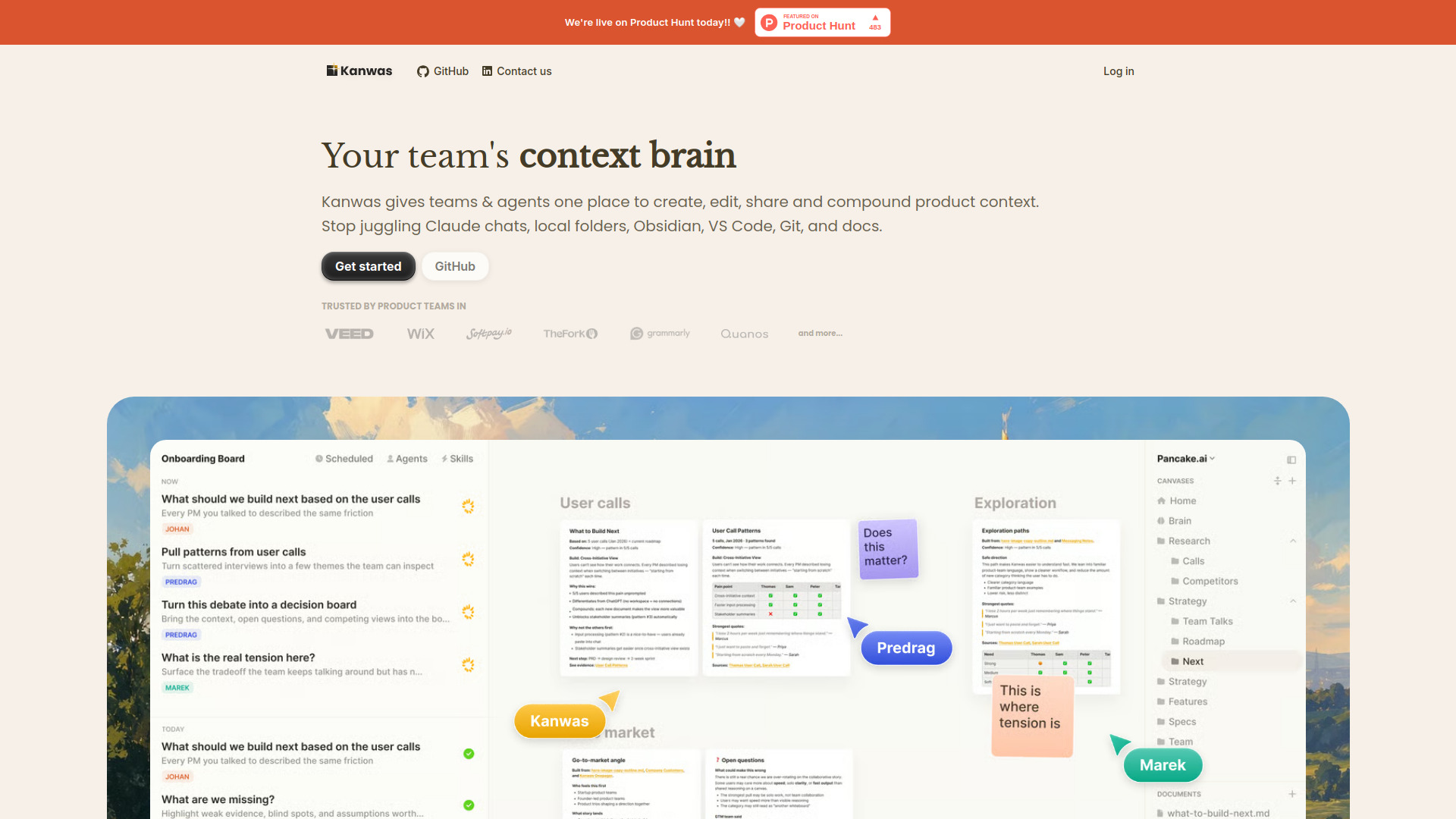
- Create, edit, and share product context.
- Collaborate with team members and AI agents on the same context.
- Generate structured, execution-ready deliverables.
- Build a compounding knowledge base over time.
Features of Kanwas
- Canvas for real work: Integrates code, docs, tasks, embeds, and iframes into a single workspace.
- Compounding context graph: Boards, notes, tasks, and decisions build a shared knowledge base.
- Agent with your instructions: Allows users to define rules, workflows, and skills for AI agents.
- Use any model: Supports various AI models like Claude, GPT, and Gemini.
- Powerful agent, no terminal: Provides terminal-grade agent capabilities without requiring command-line interface usage.
- Git-backed system of .md files: All documents are plain .md files with version history.
- Real-time collaboration: Enables live work with teammates, fast board sharing, and access control via permissions.
- 1,000+ connections + CLI tool: Integrates with existing team tools and offers a command-line interface.
- No lock-in: Ensures user ownership of files with a transparent filesystem.
Use Cases of Kanwas
- Centralizing strategy documents, market signals, and agent workflows.
- Collaborating on pitch decks, market research, and product positioning.
- Generating user call summaries, investor conversation notes, and positioning documents.
- Facilitating team alignment through shared context and reasoning.
- Creating execution-ready deliverables for product implementation.
Features of Kanwas
- Canvas for real work: Integrates code, docs, tasks, embeds, and iframes into a single workspace.
- Compounding context graph: Boards, notes, tasks, and decisions build a shared knowledge base.
- Agent with your instructions: Allows users to define rules, workflows, and skills for AI agents.
- Use any model: Supports various AI models like Claude, GPT, and Gemini.
- Powerful agent, no terminal: Provides terminal-grade agent capabilities without requiring command-line interface usage.
- Git-backed system of .md files: All documents are plain .md files with version history.
- Real-time collaboration: Enables live work with teammates, fast board sharing, and access control via permissions.
- 1,000+ connections + CLI tool: Integrates with existing team tools and offers a command-line interface.
- No lock-in: Ensures user ownership of files with a transparent filesystem.
Use Cases of Kanwas
- Centralizing strategy documents, market signals, and agent workflows.
- Collaborating on pitch decks, market research, and product positioning.
- Generating user call summaries, investor conversation notes, and positioning documents.
- Facilitating team alignment through shared context and reasoning.
- Creating execution-ready deliverables for product implementation.
FAQ
- What is the main benefit of Kanwas over whiteboards? Whiteboards are good for sessions, but bad at staying alive. Kanwas turns sessions into living shared context.
- What is the main benefit of Kanwas over chat tools? Chat is good for answers, but bad for shared reasoning. Kanwas gives teams a place to work the question through together.
- What is the main benefit of Kanwas over knowledge layers? Knowledge layers store context but are not thinking spaces. Kanwas turns stored context into living boards teams can think in.